Corporation Unknown 2011-10-06T02:02:46Z http://corporationunknown.com/blog/feed/atom/ WordPress paul http://corporationunknown.com/ <![CDATA[Farewell, Steve Jobs]]> http://corporationunknown.com/blog/?p=298 2011-10-06T02:02:46Z 2011-10-06T01:56:38Z Few depart this world having left a piece of themselves in so many others. I shall cherish my tiny share.

Thank you, Mr. Jobs. Thank you, Jobs family, for sharing him with us.

]]>
0
paul http://corporationunknown.com/ <![CDATA[How to Fix Patents]]> http://corporationunknown.com/blog/?p=294 2011-05-18T16:52:38Z 2011-05-18T16:49:43Z As I understand it, the intent of a patent is to protect the value of the invention to the inventor by giving them exclusive control of the rights to use said invention. In return, they are asked to encourage future innovation by sharing that information with the world instead of keeping it a proprietary secret. Pretty simple and straightforward, and I really have a hard time disagreeing with that being a desirable goal.

Most of the complaints about the patent system being “broken” come down to a few points:

  1. The patent is not novel; it’s an obvious method to anyone spending any mental effort on the problem space.
  2. The patent is too broad; It could cover any number of possible techniques without taking a stand on one (or a handful). This usually seems to be done to get around the requirement of sharing the information, keeping aspects proprietary. One might also consider this related to “not novel.”
  3. The inventor (or, usually, reassigned rights holder commonly referred to as “patent troll”) has done nothing with their rights to the patent on their own. On its own, there is nothing wrong with this–it would be perfectly legitimate to have a sole licensee. When combined with items 1 or 2, though, most people agree that it’s is predatory and stifles innovation rather than encouraging it.

My Proposal: Within a defined grace period after patent status is granted (I’m envisioning 5 years, maybe 7), the patent holder must show measurable revenue due to a concrete implementation of the patent, or that it is a recognizable part of another product which generates recognizable revenue. This revenue may be recognized directly by the inventor, or by licensees of the patent. If such evidence is not given within the grace period, the patent is considered fallow and control rights are revoked.

A patent that does not result in a concrete implementation within a reasonable period of time is hard to consider as “benefitting society” and thus unworthy of the rights exclusivity granted by the society in exchange.

]]>
1
paul http://corporationunknown.com/ <![CDATA[It Lives!]]> http://corporationunknown.com/blog/?p=289 2011-04-25T00:37:50Z 2011-04-25T00:35:51Z (There is no Easter-related content here; the timing is pure coincidence.)

I just received word that the 2.0 update to ESPN Passport–the last fruits of my contracting with the fine folks of RogueSheep before joining Black Pixel–went live on the App Store today. What started out as “add Facebook Places functionality” became a much smoother, more efficient and focused application that I was proud to have a part in.

If you’re at all interested in adding a social network aspect to your sports watching, go check it out. It’s free, but you’ll need to sign up for a free ESPN Passport login to get the most out of it (Facebook and Twitter logins add even more).

Passport

(By the way, have you tried RogueSheep’s latest app, Easy Alarms? I played no part in it, but it rocks all the same.)

]]>
0
paul http://corporationunknown.com/ <![CDATA[You Got Your License In My Keychain!]]> http://corporationunknown.com/blog/?p=278 2011-04-13T16:26:11Z 2011-04-13T16:18:21Z The One In Which Paul Talks Out His Hat (metaphorically, since he and hats don’t get along).

During an entertaining aside in Andy Ihnatko‘s keynote at this weekend’s Voices That Matter conference, I was reminded of a thought I’d had a while ago: Why don’t Mac desktop applications store their license info in the Keychain?

Complaining about restoring license keys should be just as trite of a humor topic as little bags of peanuts on flights, but it still holds true. Go to restore a machine, or move to a new one with a clean install, and you can write off at least an afternoon launching and entering at least two text fields per application.

Maybe I’m the only one who feels quite comfortable with syncing to MobileMe–I actually consider it the feature that keeps me coming back. (I do know there are people who have frustrating issues, and I truly feel for them, but I continue to believe they are in the minority.) Given that setup, here’s how I’d see setting up a new laptop:

  1. Configure my MobileMe account and sync down the data, setting up my Mail accounts, Address Book and Calendar–and Keychain.
  2. Launch a new copy of my licensed application.
  3. There is no Step Three. Go on your merry way.

I’m not expert enough to suggest that it would improve security of your key, but it sure would discourage casual tweaking more than the plist or hidden file schemes you’d need to develop on your own. Also, separation of license key from a preferences file (hopefully developers are already doing this) allows a user to delete the preferences and start fresh without having to worry about relicensing.

I understand that Keychain development can be convoluted, but is that reason enough to not make the user’s life a little bit easier and your support burden of finding a lost license a little less frequent?

As I said at the top, I realize I’m talking out of my…hat here. I don’t have experience doing this (yet), so I am interested in hearing reasoned arguments. Until and unless this is proven untenable, simply consider it a feature request for your next release.

]]>
7
paul http://corporationunknown.com/ <![CDATA[iPad and the Digital Hub, Revisited]]> http://corporationunknown.com/blog/?p=274 2011-03-10T16:39:58Z 2011-03-10T14:33:02Z Apple released iOS 4.3 yesterday, and it looks like iTunes Home Sharing provides almost everything I had wished for in my original post.

There seem to be some quirks (all videos and podcasts are marked as unplayed on the device) and other behaviors I’d like changed (watching/listening to a podcast on the device doesn’t report that to the shared library). These niggles are really just small issues compared to the big advance of having access to my full library.

Thank you, iOS team!

]]>
0
paul http://corporationunknown.com/ <![CDATA[Year in Review 2010]]> http://corporationunknown.com/blog/?p=261 2011-01-11T19:50:30Z 2011-01-11T16:19:29Z It’s still the first half of January, so I’m in the grace period for a “Year in Review” post.

2010 was one heck of a slingshot year for me and Corporation Unknown. I started the year unemployed and thin on contract work, and finished it with Corporation Unknown’s highest revenue in its 3-year history and a job offer I can’t refuse.


Bankruptcy

After starting out looking promising, 2009 was rough. The latter half was my first try at full-time independent contracting. I spent time working on project proposals where the client apparently went with someone willing to work for $25/hour; I did work on a decent project (iPhone client for the web site they were developing) that then went “on hold” once the company I was subcontracting for realized that their client was behind on payments to the tune of six digits. (They paid me in full, I don’t know if they ever got the same.)

At the beginning of 2010, my wife and I filed for personal bankruptcy. This isn’t something I’m proud of, but I refuse to hide it as a personal shame. I debated even mentioning this here, except for two points I hope might be able to help others approaching a similar situation:

  1. Start looking into bankruptcy before dipping into retirement savings. Most likely, those funds are protected from the proceedings and you won’t have to start over.
  2. The idea of paying a lawyer $3k to file for bankruptcy seems wrong, doesn’t it? It was completely worth it. Under our attorney’s advice, we knew exactly what to expect with no surprises. Sometimes when trying to restart parts of your life, it’s refreshing to just chuck it all and walk away, consequences be damned–this is not one of those times.

Contracting

Independent contracting in 2010 was hot and cold. More accurately, cold then hot, and feast or famine. I’d go without prospects for a while, then have a few come all at once that I actually had to choose from. Managing a client pipeline is not easy as a solo contractor.

In the spring, I had the opportunity to work with local friends Black Pixel on a small part of a fairly large project for iPad–before its release. It’s hard to believe the iPad hasn’t been out a full year yet; recalling having to code for iPad without a test device feels like reminiscing about the punchcard days.

I had a good time working on that project, even though it was all too brief. The team was wonderful, and even though it feels unfair, I have to single out the experience of working with Chris Clark. It was the first time I’d had the opportunity to work on an iOS project with a dedicated designer–one who listens, takes feedback, and respectfully tells you you’re either wrong, or he just prefers his design anyway–and I loved that.

At that time, I was also working on a project with a existing client. They had an iPhone app that I had cleaned up somewhat, and the announcement of iPad seemed an ideal fit for their product. Unfortunately, in the early days of the iPad, I still needed a lot of experimenting to get a feel for what “worked” and what didn’t. In their desire to get in to the field as quick as possible, they felt that the project was taking too long and ended up opting out of the contract.

Then in May, I had the opportunity to do some subcontracting work for fellow locals RogueSheep. The project was for a component of an iPad app that, once I got past the “why would you want to do that?” aspect, provided some interesting challenges in designing custom controls and animations, and I loved that.

RogueSheep is another great team, and another great designer in Brad Ellis (even if he has since moved on to Square). Brad has the same positive qualities as Chris, with the addition of slightly crazier ideas that push you to create something you wouldn’t have imagined on your own.

Thankfully, the Sheep have continued to have a project pipeline for me to work on: I wrote another bit of code that I’m not even sure has made it onto the store yet for the same client; I wrote some UI code for RogueSheep’s own TouchUp for iPad application as they were readying it for release, and I’m in the process of finishing off another pretty major iPhone project for another of their clients. They even let me touch their Apple Design Award.

Thanks in large part to RogueSheep, in its first full year of full-time effort, Corporation Unknown has recorded its highest annual revenue:

CU Revenue.png

Onward

This year already has some promising challenges ahead:

  1. Beginning in March, I will be teaching “Developing with the iPhone SDK,” the middle course of the iPhone and Cocoa Development certification from the University of Washington’s Professional and Continuing Education.
  2. I have accepted an offer to return to Black Pixel full-time beginning in February. It’s been tough feeling like I’m choosing between two great companies and teams, but I am really excited to be rejoining Black Pixel’s now-expanded team and continuing to kick some iOS butt.
  3. On top of all that, our second child is due at the end of July.

2011 is going to be a busy year!

]]>
1
paul http://corporationunknown.com/ <![CDATA[Bughunting a Bashful Table View]]> http://corporationunknown.com/blog/?p=250 2010-12-14T15:53:52Z 2010-12-14T15:46:15Z I ran down a strange bug yesterday that I thought I would recount in the hopes of saving someone else the half day of frustration.

I was going along, minding my own business, implementing a typical -tableView:didSelectRowAtIndexPath: delegate method to create a view controller, push it onto the navigation stack, and then…nothing. The view didn’t appear, and the app interface became unresponsive. Numerous pauses in the debugger showed what would appear to be normal stacks in the running of the app–no infinite recursion going on, thankfully.

The view was actually in a strange nesting of UITableViewControllers, UINavigationControllers and UITabBarControllers, so I reworked that to the bare bones of a UITableViewController pushing a freshly made UITableViewController onto its navigationController. I verified that it was being initialized properly, and that I had a valid navigationController to push onto (and other view controllers did push with the same navigationController). Still no change.

Then I added breakpoints to every UITableViewDelegate and DataSource method I’d implemented, even the trivial hardcoded ones (“return 3;” for -numberOfSectionsInTableView:) at first to ensure they were being called (they were). Thus began the tedium of following the chain of 4 or 5 calls per table row until I found the offending code.

This new table view is composed of a number of sections each composed of only one cell. The cells are designed in Interface Builder as top-level objects, and are IBOutlets of the File’s Owner View Controller. Technically, it’s one big scroll view but I’m using this design to provide some layout flexibility if the client wants to reorganize sections, and I thought it would be cool to have the dynamic scrolling of section headers, too.

Since I want the IB objects to define the layout, I determine the height of each row based on the view’s frame:

	height = CGRectGetHeight( self.playerStatsCell.frame );

The value for height of this cell (the last on the list–the others were fine) was a “whopping” 6.30104785e-38. What was going on here?!

Well, self.playerStatsCell wasn’t actually connected yet because I was testing (trying to test) one row/section at a time. Calling the frame method on a nil object seems like a normal thing to do in messaging-nil-happy Objective-C. But it’s not. The call is effectively short-circuited, and the temporary CGRect variable the return value was supposed to fill is left uninitialized, which is the bizarre height value returned by CGRectGetHeight.

This call is equivalent to:

	CGRect frame; // uninitialized struct
	frame = self.playerStatsCell.frame;
	height = CGRectGetHeight( frame );

A simple change to the following would fix it:

	CGRect frame = CGRectZero; // initialized struct
	frame = self.playerStatsCell.frame;
	height = CGRectGetHeight( frame );

(In my case, I resolved it by connecting a temporary cell object in IB.)

What did I learn from this?

  1. Messaging to nil is normally fine, but definitely not for struct-returning methods.
  2. Returning a cell height that is very, very tiny from -tableView:heightForRowAtIndexPath: results in “strange behavior.”

I still don’t know exactly what the app was doing while it wasn’t displaying the new table view, but now I know what to quickly look for when I can’t push a UITableViewController in the future.

]]>
0
paul http://corporationunknown.com/ <![CDATA[Sudden Termination]]> http://corporationunknown.com/blog/?p=247 2010-10-30T22:21:33Z 2010-10-30T22:19:42Z Today, Tim Bray commented about Android applications needing to frequently save their restore state and be ready and able to gracefully terminate without notice. (This behavior also applies to iOS apps, of which I have much more experience than Android.)

At some point, after I’d explained a few times why you have to write software this way on Android, I started wondering why all software, without exception, isn’t written this way by default.

As of 10.6, Apple added enableSuddenTermination and disableSuddenTermination calls to the NSProcessInfo API to allow you to implement similar behavior on the desktop. At its most simplistic description, you can inform the system your application doesn’t need to have its memory paged back in just to destroy it all–just kill the process and you will be sure it behaves properly on relaunch.

I encourage all fellow iOS developers who have already acquired a “sudden termination” design style to make note of this when developing a desktop Cocoa application; I also encourage desktop Cocoa developers to start thinking about how they would design with this paradigm, as it will be one more portable technique when and if you decide to go mobile.

(NSCache and Purgeable Memory is another new-to-10.6 mechanism I consider similar to iOS’ didReceiveMemoryWarning, only giving the OS permission to purge memory instead of it requesting you clean up.)

]]>
0
paul http://corporationunknown.com/ <![CDATA[iPad and the Digital Hub]]> http://corporationunknown.com/blog/?p=239 2010-07-08T18:51:17Z 2010-07-08T18:46:50Z Yesterday I tweeted about a feature I would like:

Want: iPod on iPad able to browse desktop iTunes à la Home Sharing. Watching WWDC videos on iPad w/o having to sync first–yum.

I received a few recommendations for Air Video and StreamToMe. I’d forgotten that I’d downloaded Air Video but hadn’t set up the server; I’d also forgotten about StreamToMe even though I subscribe to Matt Gallagher’s blog.

I fired up the Air Video Server and started it serving the iTunes U playlist. Connecting and browsing from the iPad client was simple and straightforward. Trying to stream a WWDC video paused to buffer annoyingly often–which I blame less on the software than the 2GHz Mini it was running on, which probably also had the misfortune to have Time Machine kick in at the same time. But it doesn’t seem to have a functionality I implied by the “Home Sharing” reference: Copy the video to the iPad to watch elsewhere later. StreamToMe looks to have similar features (and lack thereof) to Air Video, so I didn’t test it.

I appreciate the recommendations, I really do. But neither of these can get past the one requirement I didn’t specify: I don’t want a third-party solution. My tweet was really a passive-aggressive desire to have Apple implement this.

I have fully committed to iTunes being my central media repository. It serves 157GB of my music, 148GB of movies, 100GB of TV shows, 144GB of iTunes U videos (primarily WWDC videos) and a variable amount of audio and video podcasts. As a result, I don’t have many files in formats foreign to iTunes, which both these applications seem focused on solving and I expect they handle admirably.

Both of my AppleTVs can access any file in the desktop’s iTunes library, even though with 40GB and 160GB drives they obviously can’t hold copies of everything. (True, I can’t instruct an AppleTV to copy files to itself, but I don’t feel the desire to pick it up and take it elsewhere, either.)

My iPad cannot access all the files.

My laptop can browse any file on the desktop’s iTunes library; thanks to Home Sharing it can copy any file just by dragging it to the local library. It can even browse other libraries that are shared on the network.

My iPad cannot copy files to its local library, or browse other shared libraries.

The “digital plumbing” is there in DAAP and Home Sharing to make this happen, but third party developers are left to write their own servers to support their clients. I have no reason to distrust InMethod or Matt Gallagher–and I’m pretty sure that either of them can write a better server than I ever could–but each additional server increases the likelihood of conflicts and security problems, so I don’t want to install and maintain additional, practically redundant servers.

I want a digital hub; one machine serving the same media in different ways is not a hub.

During the iPad announcement, Steve Jobs positioned the iPad as a third type of device “between a laptop and a smartphone.” In my experience, that’s an astute description. In regards to media handling, though, I feel the iPad still behaves much more like my iPhone than my MacBook Pro.

]]>
1
paul http://corporationunknown.com/ <![CDATA[My Accessorizer Configuration]]> http://corporationunknown.com/blog/?p=216 2010-06-28T04:33:20Z 2010-06-27T19:52:28Z Due to “overwhelming demand,” I am sharing my configuration set for Accessorizer here. I think there needs to be some explanation to many of the decisions, though, so here you go. This is not intended to be an interminable discussion of coding style and practices, though–if you disagree, go ahead and make your own configuration based on mine. This is also not intended as comprehensive documentation for Accessorizer–read its included documentation, explore tooltips, and experiment freely.


Download the Corporation Unknown configuration for Accessorizer.

At a previous employer, we ran into issues where newcomers were confused by Objective-C’s memory management, especially the differences between using properties (and dot notation) and directly accessing the ivar. As you might expect, this led to many memory-related problems. I’ve long been a proponent of only using accessors to access a member unless you have a darn good reason. (And Cocoa’s ? automatic key-value observing makes it even more difficult to have a good reason not to.) In order to visibly identify accessor-vs-direct access, we instituted a naming convention to make direct access look wrong: ivars are named with an underscore prefix (“_ivar”) and properties are not. To make this even more obvious that ivars are implementation details, we declared them @private.

You may disagree with this methodology; that’s fine. But without this context, you might have a hard time understanding my configuration decisions–and why Accessorizer especially rocks in this setup.

When I first started using Accessorizer, I thought of it as a code generator, and it’s hard not to chafe at your disagreements with how code generators generate code. I’ve found that thinking of it as a code template generator makes it easier: Generate the majority of stuff you use, omit the stuff you don’t normally use, and be comfortable with the knowledge that you will regularly have to tweak its output–it’s still better than writing it from scratch every time.

Accessor Style

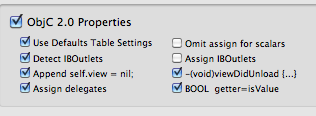
Accessorizer Properties

  • “ObjC 2.0 Properties” is always turned on. Period.
  • I always use the Defaults Table (more about that later).
  • “Detect IBOutlets” automatically inserts the “IBOutlet” declaration into recognized subclasses. Sometimes it doesn’t identify a class I want to be an IBOutlet, but I find this to be right much more often than it is wrong.
  • “Append self.view=nil” is a somewhat strangely worded option. Checking it will generate code to nil those properties identified as IBOutlets. Combined with the “-(void)viewDidUnload” checkbox to its right, it will generate a full viewDidUnload method to release your IBOutlets.
  • “Assign delegates” automatically overrides your assign/retain/copy property generation setting to be “assign” for any “id” property (or others identified as a delegate form; again, I find more often right than wrong).
  • I uncheck “Omit assign for scalars”. True, the “assign” is not necessary, but I find it easier to scan for “assign” when I’m code reviewing than have to think about each type and whether it is handled appropriately. (According to Apple’s documentation, “assign” is also required for garbage collection but I haven’t written any GC code yet.)
  • “Assign IBOutlets” is unchecked. I guess I’m still in the “retain outlets” camp, until I bother to change my mind.
  • “BOOL getter=isValue” automatically identifies a “BOOL running” property and defines the getter as “isRunning”, just as Apple recommends.

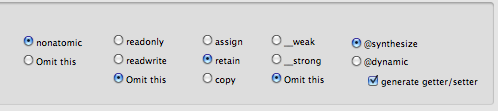
Accessorizer Properties 2

  • Since I’ve primarily been coding for iOS lately, I declare my properties “nonatomic”. If/when you’re working on the desktop, you probably want “omit this”–change it or create a “desktop” configuration.
  • I omit readonly/readwrite. Most of the readonly properties I create are not backed by ivars, so I find I don’t need to override this behavior often.
  • I haven’t been much concerned about __weak or __strong, so I omit it. You may decide otherwise.
  • “@synthesize” will create appropriate @synthesize statements when generation the Implementation. (Be sure to check “generate getter/setter”, even though it applies to @dynamic–I’ll explain later when talking about Defaults Table.)

Getter/Setter settings

Accessorizer Getters and Setters

Not much to say about these settings other than “Use Defaults Table”. They don’t come into play very often, since I mainly use @synthesized properties but these settings work for me when I don’t. To see the effects on generated code, temporarily switch your properties generation to @dynamic with “generate getter/setter” checked and Implementation being generated–changes will be reflected as you make them.

Dealloc

Accessorizer Dealloc

  • I default to “self.property = nil” behavior; I know others disagree. If you’re one of them, simply change the option to “release” in your configuration. If you do agree, or simply want to give this way a try, make a point of removing any related KVO or NSNotification observers before these generated lines or you will receive notifications of the nil settings and you most likely don’t want that.
  • “dealloc full block” is the primary reason I am not just making my configuration available without comment. If you were to just take my configuration and copy the generated code, it would break your build because I leave this deselected so it’s not in a code block. As I develop my classes, I add ivars and use Accessorizer to generate the related code. Most of the code is pretty easy to wholesale copy-n-paste, but I tend to have more logic in dealloc than Accessorizer can know about (KVO and NSNotification removal, setting delegates to nil, etc.) and I find it easier to copy this generated dealloc code into an existing method than to use this as a dealloc method and move existing behaviors into it. If you want a full dealloc method, just check the box.

Init and Undo

I’m not sure why, but I still tend to write my own init methods. Someday I’ll explore using Accessorizer for this and Undo registration more fully; until then, you’re on your own.

Defaults Table

The defaults table is used to override the “one size fits all” property generation based on the ivar’s type. I have configured every superclass of “NSMutable<Something>” to default to “copy” instead of the default “retain” in order to avoid holding reference to a mutable object when I’m expecting immutable. (This is explained in Apple’s documentation.) I don’t even use some of these classes, but when I do I don’t want to be surprised. I’m always free to edit the declaration on a case-by-case basis, but this is the behavior I want ninety-some percent of the time.

Another fun feature of the Defaults Table is the “generation” setting. If you have a class type whose behavior you tend to override often, define its generation as “dynamic”. Every time you use that class type, Accessorizer will generate an @dynamic declaration–and the accessor methods for you to use as a starting template. (This is why I check the “generate getter/setter” in the Accessor tab even though it normally won’t do anything.)

Custom Table

I don’t really use this tab, and I don’t believe any of it gets saved into a configuration set since it’s primarily for point-and-click tweaking of behavior on an ivar-by-ivar basis.

Coding Style

Accessorizer ivar Prefix and Suffix

As I mentioned, I prefix my ivars with an underscore, so here is where I define that. By defining my ivar Prefix as “_” and Suffix as “none”, Accessorizer automatically recognizes that underscore and strips it when declaring the property. It also properly declares the backing ivar in the @synthesize directive.

  • The Argument Prefix is used when generating methods like -initWith{…}. I vacillate between “a” and “none”.
  • Formatting Properties: new to 2.0 is the ability to tweak whitespace in declarations more than you could in previous versions. I’m happy because now I can use my preferred “NSString* title” form; I know many others still hew to the “asterisk must bind the the variable, not type” but you’re free to change it for yourself.
  • Formatting Methods: Configure the display to generate some accessor methods and experiment with these settings to see which layout you prefer. The “Tight” spacing option is actually more compressed than I like, but I find the “Spaced” option way too spread out (and I’m someone who loves whitespace). Therefore, I default to “Tight” because it’s easier to insert the few spaces I prefer than delete all the ones I don’t.
  • Formatting Pragma Marks: I love me some pragma marks, but try not to go overboard with them. Feel free to experiment.
  • Init Style: Apparently, “self = [super init]” is the current Apple-approved format. I’m ambivalent.

Collection Accessors, Keyed Archiving, KVO, Locking, Singleton, General and Sort

Most of these tabs are more hands-on generation of code. You need to enter a class name, and it will generate code right there–I don’t use these as frequently as accessor generation, and you can tweak the layout more directly when you do need it. At some point, I may have changed my settings from the defaults you would encounter in a new install, but I don’t really have strong suggestions for you here.


]]>
0